
ebtEDGE NEW!
Fidelity Information Services LLCFinance
4.21.60K Reviews
- Version
- 5.0.1
- Installs
- 500.00K
- Age Rating
- Everyone
Screenshots
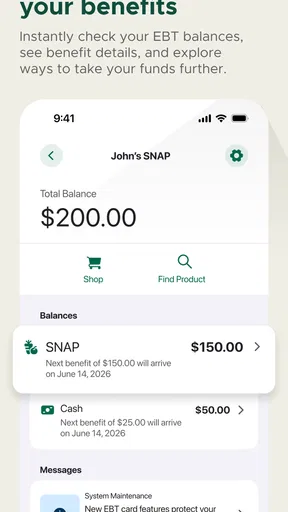
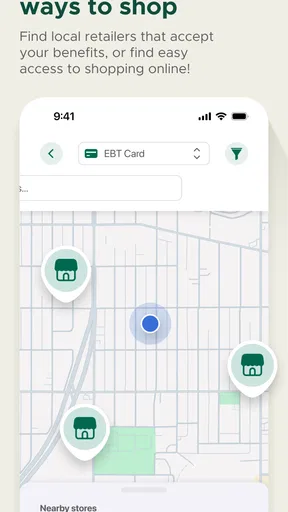
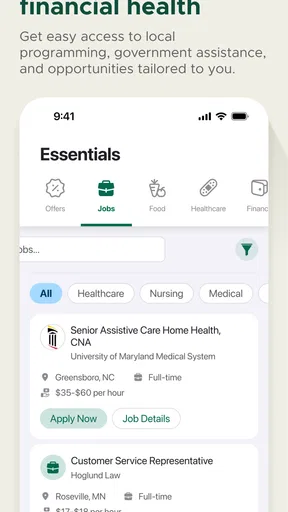
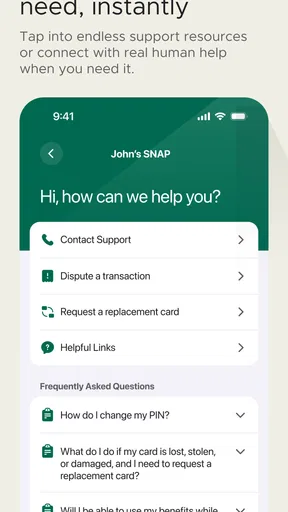
Our Review of ebtEDGE NEW!
 Analysis by Appyee
Managing public benefits is one of those jobs where a small amount of clarity can make an ordinary week feel much less stressful. ebtEDGE NEW! is a finance app built for people who use SNAP, Childcare, or WIC benefits through a participating state program. I approached it less like a novelty download and more like a practical tool: something that needs to earn a place on my phone by helping me check information quickly, repeatedly, and without adding confusion.
The app is free, carries an Everyone age rating, and comes from Fidelity Information Services LLC. Its current version is 4.0.1, and it requires Android 7.0 or later. Those details make it accessible to many older devices, which matters for a benefits app because replacing a phone should not be part of the process. The store shows a 3.1 average from around 663 ratings, with roughly 420 written reviews, and more than 100K installs. That reception suggests a useful but imperfect experience rather than a universally smooth one.
What the first week feels like
My first impression is that this is an app for checking and managing benefit information, not a general budgeting platform. That distinction is important. It is not trying to replace a bank app, a grocery receipt, or a full household finance system. Its value comes from putting benefit-related information in one place so I do not have to rely entirely on memory, paper records, or a separate state website every time I need reassurance before shopping.
The most useful early habit is opening the app before leaving for the store rather than waiting until the checkout line. That simple change gives me a chance to confirm the information I need while I still have time to adjust a shopping list. For a household using more than one benefit program, having SNAP, Childcare, and WIC-related access associated with the same official app can also reduce the number of places I need to remember.
A realistic example is a parent planning a grocery trip after work. The household budget is tight, the shopping list includes both regular groceries and items connected with WIC, and there is no desire to discover a problem at the register. Checking ebtEDGE beforehand can help turn that trip into a planned decision instead of a guess. Even when the app does not eliminate every uncertainty, that pre-shopping check is a better workflow than treating the checkout screen as the first test.
There is also a psychological benefit during the first week. Benefit balances and program details can be easy to lose track of when several household expenses compete for attention. An app that becomes the first place I look can reduce repeated calls, searches, or handwritten notes. I would not call that exciting, but it is exactly the kind of quiet convenience that can make an app worthwhile.
Where the early usefulness ends
The app should not be mistaken for a universal answer to every benefits question. Its purpose is tied to state benefit access, so the experience depends heavily on the program and account situation behind it. If I need broader advice about eligibility, renewal paperwork, a case decision, or a disputed transaction, an app alone is unlikely to replace the relevant agency process.
That is the first important trade-off: ebtEDGE can be a convenient access point, but convenience is not the same as complete case support. I would keep any official letters, account notices, or confirmation details that matter. The app is best used as part of a benefits routine, not as the only record I trust for a complicated administrative issue.
Another early adjustment is learning when to use the app and when to use the usual alternative. A state website or agency contact may be better for formal changes, detailed explanations, or problems that need human review. The app is more attractive for quick, repeat checks. I find that dividing those jobs clearly prevents disappointment: use the app for access and awareness, and use the official support route for issues that require interpretation or correction.
Why it can remain useful from month to month
The strongest case for keeping this app installed is repetition. Benefits are not a one-time task. People may need to check information before several shopping trips, coordinate purchases around household needs, or confirm that they are looking at the right program details. A tool that saves even a little effort each time can become more valuable through habit than through any single standout feature.
I especially like the idea of using it at three points in a monthly cycle: when planning the first major grocery trip, before a smaller mid-month purchase, and whenever a household change makes the available amount especially important. That rhythm is more reliable than opening the app randomly. It also helps separate a genuine account issue from a simple memory mistake.
For WIC users, the practical challenge is often not just knowing that benefits exist but planning purchases carefully. The app can serve as a starting point before making that plan. I would still check product eligibility and local program guidance separately when needed, because a balance view does not automatically answer every question about what can be purchased. This is one of the less obvious ways to use it well: treat the app as the first step in a shopping workflow, not the complete shopping rulebook.
For SNAP users, the recurring value is similar but broader. A quick check can support a household budget without forcing every decision into a full spreadsheet. I can look at the available benefit information, compare it with the shopping list, and decide whether to buy everything now or divide the trip. That makes the app useful even for someone who already has a banking app, because bank balances and benefit balances serve different purposes.
Childcare benefits create another reason to return regularly. Families often have timing and planning concerns that do not fit neatly into ordinary grocery budgeting. Keeping benefit access close at hand can make it easier to check the relevant information before making arrangements or discussing expenses with another caregiver. The benefit is not that the app solves childcare administration; it is that it can reduce the friction of looking up the account information connected with it.
A better routine than constant checking
I would not recommend opening the app compulsively. Constant checking can create more anxiety than clarity, especially when the information does not change every hour. A better routine is to check before a meaningful decision: shopping, planning a household expense, or reviewing whether the month’s benefits are being used as expected.
That routine also protects the app from becoming another source of notification fatigue or mental clutter. The lasting value of ebtEDGE is not measured by how often it demands attention. It earns its place when it is easy to reach at the right moment and then easy to close once the information has done its job.
One practical tip is to keep the app near other tools used for errands rather than burying it in a folder of financial apps. That small placement choice makes the intended workflow more natural. Another is to avoid relying on a screenshot as a permanent record. A screenshot can become outdated, while the app is more useful when I open it to check current information at the moment I need it.
Maintenance, friction, and the cost of keeping it
Because this is a finance app connected with benefit access, maintenance matters more than it would for a casual utility. I would keep the app updated, use a secure device lock, and avoid treating a shared or public phone as a safe place for account access. These are ordinary precautions, but they are particularly important when an app relates to household assistance and personal account information.
The current release is 4.0.1, and the app’s minimum operating-system requirement is Android 7.0. That relatively broad compatibility is helpful for people using older phones, but I would still check that the device itself is receiving dependable security updates. An app being able to run on an older operating system does not automatically make every older phone a good place for sensitive account activity.
There is also a maintenance habit that has nothing to do with software updates: keeping login and account details organized. If I forget the information needed to access the account, the app cannot deliver its main benefit quickly. I would store recovery information safely and avoid writing sensitive details in an exposed note on the phone. This is a small but important insight because the most frustrating “app problem” can actually be an account-recovery problem.
Another point of friction is that official benefit systems can feel less forgiving than ordinary consumer apps. A banking app may offer polished explanations, broad transaction history, and familiar support options. A benefits app has a narrower purpose and may leave me needing a separate channel when something looks wrong. That does not make ebtEDGE useless, but it changes what I expect from it.
If the app seems slow, unavailable, or unable to show the information I need, I would avoid making a rushed decision based on a blank or unclear screen. I would try again later and use the appropriate official support route for an urgent account concern. The key maintenance lesson is to keep a backup plan: know where to find state assistance or program support without assuming the app will always be the only working doorway.
What may cause fatigue after the novelty fades
The first-week appeal comes from having a dedicated place to look. The long-term challenge is that access alone can feel repetitive if the app does not fit neatly into my real routine. If I rarely use SNAP, Childcare, or WIC information, I may not gain enough from keeping another finance icon on the phone. The app makes the most sense for people who return to these benefits often enough for quick access to matter.
The 3.1 average indicates that the experience has not been frictionless for everyone. I would read that as a reason to keep expectations practical. A middling rating does not erase the app’s official purpose, but it does suggest that account access, reliability, or usability may sometimes affect how people feel about it. I would install it because of the job it performs, not because I expect the kind of polished, effortless experience associated with the best consumer banking apps.
Fatigue can also come from having to switch between the app and other sources of information. A user may check a benefit balance in ebtEDGE, consult separate shopping guidance, and then contact an agency about a case question. That is not necessarily a flaw in this particular app; different tasks belong to different systems. Still, it means the app is less satisfying for anyone hoping for one complete dashboard for every part of benefits administration.
Another source of frustration is using it at the wrong time. Opening it at a checkout counter, with a long line behind me and a question about an item’s eligibility, is a poor test of any benefits app. The better approach is to use it earlier, when I can read carefully and make a different plan if necessary. This is a concrete trade-off: a few minutes of preparation can make the app feel dependable, while last-second use can make the entire process feel more stressful.
I would also skip it if I am looking for investment tracking, credit monitoring, bill payment, or ordinary bank-account management. The finance label should not create the impression that it competes directly with those tools. A general budgeting app may be better for tracking household spending, while a bank app may be better for cash transactions. ebtEDGE has a narrower role, and its usefulness depends on needing that role.
Who gets the most from it
This app is a good fit for someone who regularly uses SNAP, WIC, or Childcare benefits and wants a direct mobile access point. It is also useful for caregivers who help a family member keep track of benefit information, provided account access is handled carefully and with the account holder’s permission. People using older Android phones may appreciate that the app supports Android 7.0 and later.
I would be more cautious about recommending it to someone who only needs benefits information once during an application or renewal process. For a one-off administrative question, a state website, printed notice, or agency contact may be more appropriate. Likewise, someone who needs detailed case explanations should not expect a quick account app to replace direct assistance.
The free price removes one obvious barrier, but free does not mean effortless. The real cost is attention: remembering access details, checking information at sensible times, keeping the device secure, and knowing when to move a problem to another official channel. For many users, that cost is reasonable because the app supports a recurring need. For occasional users, it may not justify changing an established routine.
My long-term verdict
After the novelty fades, ebtEDGE NEW! earns lasting space when it becomes part of a deliberate benefits routine. I would keep it installed if I were checking SNAP, WIC, or Childcare information regularly, especially before shopping or planning a household expense. Its best quality is not entertainment or visual polish; it is the possibility of reducing repeated searching and uncertainty around a specific financial responsibility.
My recommendation comes with clear boundaries. I would not depend on it as the sole answer for eligibility, disputed transactions, account recovery, or complicated agency decisions. I would also avoid judging it by the standards of a full-service bank app. Its narrower purpose is both its strength and its limitation: it can be relevant every month, but only for the people whose benefits match what it is designed to handle.
The app’s official connection to Fidelity Information Services LLC, its free availability, and its support for older Android versions make it easy to consider. Its audience is also clear, with an Everyone rating and more than 100K installs showing that it is intended for broad everyday access rather than a specialist financial audience. The average of 3.1 means I would approach it with patience and a backup plan instead of assuming every interaction will be smooth.
In my view, the right question is not whether this is the most sophisticated finance app on a phone. It is whether it makes benefit information easier to reach at the moments when a household needs it. For a frequent SNAP, WIC, or Childcare user, the answer can be yes. For someone seeking broad money management or comprehensive case support, a different option will serve better. The lasting value is practical access, provided I use it as one part of a careful benefits workflow rather than expecting it to do everything.
Privacy and Permissions
See what permissions an app requests and how it handles your data.
- Location
- approximate location (network-based), precise location (GPS and network-based)
- Photos/Media/Files
- read the contents of your USB storage, modify or delete the contents of your USB storage
- Storage
- read the contents of your USB storage, modify or delete the contents of your USB storage
- Camera
- take pictures and videos
- Wi-Fi connection information
- view Wi-Fi connections
- Other
- view network connections, full network access, prevent device from sleeping, Google Play license check
Verdict
Strengths of ebtEDGE NEW!
- Quickly view EBT balances and recent transaction history.
- Supports multiple benefit accounts in one convenient app.
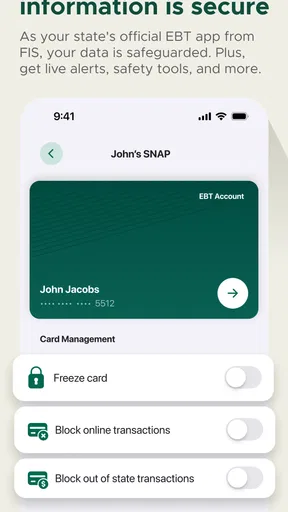
- Card-lock features can help protect benefits if your card is lost.
- Official account access reduces reliance on third-party services.
- Useful notifications can help track deposits and account activity.
Limitations of ebtEDGE NEW!
- Availability and features may vary by state or benefit program.
- Login or verification issues can prevent access when you need it.
- Some users may experience slow loading during busy periods.
- Requires internet access for most account and transaction features.
- The interface may feel less intuitive for first-time benefit users.
Similar Picks in This Category
View All
Google Wallet
Google LLC4.3

Airtel: Recharge, Bank & Loans
Airtel4.0

PayPal - Pay, Send, Save
PayPal Mobile4.2

DANA Indonesia Digital Wallet
PT Espay Debit Indonesia Koe4.5

Binance: Buy Bitcoin & Crypto
Binance Inc.4.8

Cash App
Block, Inc.4.7
Frequently Asked Questions
What is ebtEDGE NEW! used for?
ebtEDGE NEW! is a mobile companion for people who use participating Electronic Benefit Transfer programs. After signing in with the required account details, users can typically review available benefit balances, check recent transactions, view deposits, and manage certain card-related information. The exact services can vary depending on the state or agency that issued your EBT card, so not every feature will be available to everyone.
Can I check my SNAP or cash assistance balance with ebtEDGE NEW!?
Yes, the app is designed to help eligible cardholders check their current EBT balance and review recent activity without calling customer service or visiting a benefits office. Keep in mind that the displayed amount may change after purchases, deposits, refunds, or pending transactions. For the most accurate information, allow the app to refresh and compare the details with your latest receipt when necessary.
Is ebtEDGE NEW! available for every EBT cardholder?
Availability depends on the state, territory, or agency responsible for managing your EBT account. Although ebtEDGE supports many participating programs, some cardholders may need to use a different official app, website, or telephone service. Before downloading, check whether your EBT card issuer is supported and use only the official application listing to avoid entering sensitive account information into an imitation app.
How do I protect my personal information when using ebtEDGE NEW!?
Because the app may provide access to benefit balances, transaction history, and card-management tools, you should treat it as a sensitive financial service. Use a strong, unique password, enable available security options, avoid signing in on public or shared devices, and never disclose your PIN or verification codes. Keep your phone’s operating system and the app updated, and contact your card issuer immediately if you notice suspicious activity.
What should I do if ebtEDGE NEW! is not working or my balance looks incorrect?
First, check your internet connection, update the app, and try signing out and signing in again. Temporary maintenance or agency-system delays can prevent balances and transactions from appearing immediately. If the problem continues, use the customer-service number printed on the back of your EBT card or contact your local benefits agency. Do not rely on an outdated displayed balance before making an important purchase.
